


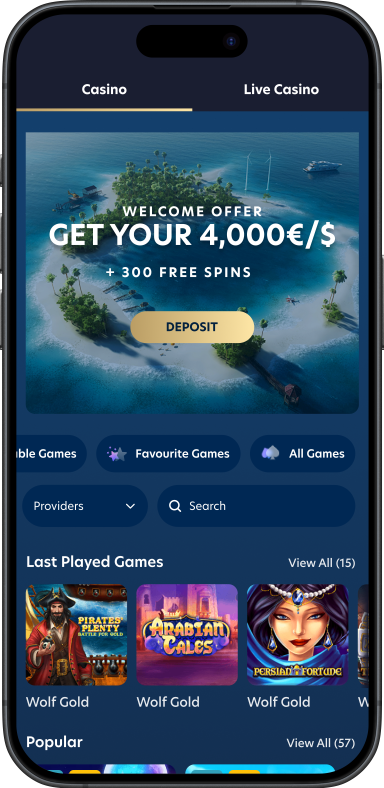

Setting Up the Home Screen App
Start by loading Lucky Dreams in your phone's browser, then follow the instructions for your operating system. The whole thing takes under a minute, and it makes no difference whether you log in before or after creating the icon.
iOS: iPhone and iPad with Safari
- Load the Lucky Dreams site in Safari.
- Press the Share icon (a square with an upward arrow), found at the bottom of the screen on iPhone and at the top on iPad.
- Scroll through the menu and select Add to Home Screen.
- Leave the label as "Lucky Dreams" or rename it, then press Add.
- From now on, open the casino with the LD icon on your home screen.
Newer versions of iOS also let Chrome and other browsers add a home screen shortcut through their share menu. If the option doesn't appear, update iOS and try again in Safari.
Android with Chrome
- Load the Lucky Dreams site in Chrome.
- Open the three-dot menu at the top right.
- Select Install app or Add to Home screen (the wording varies by phone).
- Check the name, then tap Install or Add.
- Launch Lucky Dreams from the new icon on your home screen or in the app drawer.
Firefox, Edge and Samsung Internet offer the same feature in their menus, typically labelled "Add to Home screen" or "Add page to".
Mobile App Facts at a Glance
| Question | Short answer |
|---|---|
| Available on the App Store? | No |
| Available on Google Play? | No |
| Official APK file? | None exists. Avoid APKs offered by other sites. |
| Getting the icon | "Add to Home Screen" in Safari, or "Install app"/"Add to Home screen" in Chrome |
| Full-screen mode | Yes. The site is built as a web app, so the icon opens it without the browser address bar |
| Price | Free |
| Space on your phone | Next to nothing, because it's a shortcut rather than installed software |
| Updating | Happens on its own each time you open it |
| Linked to your desktop account? | Yes: the same sign-in details, balance, bonuses and loyalty progress |
Comparing Your Options: Browser, Home Screen Icon or APK
Players generally try one of three routes to get Lucky Dreams on their phone. Two are official and safe; the third is not.
| Feature | Mobile browser | Home screen app | Third-party APK |
|---|---|---|---|
| Provided by Lucky Dreams | Yes | Yes | No |
| Files to download | None | None | Yes |
| Opens in one tap | Only via a bookmark | Yes, via its own icon | Yes |
| Full-screen display | No, browser bars remain | Yes | Unknown |
| Up to date automatically | Yes | Yes | No guarantee |
| Phone permissions needed | None | None | Frequently several |
| Risk level | Low | Low | High: could contain malware or a fake login page |
Android lets you install apps from outside Google Play, which is why some unofficial websites advertise a "Lucky Dreams APK". The casino doesn't release one, so any APK carrying the name comes from a third party. Installing it could hand control of your phone, and your login, to a stranger. The browser and the home screen icon are the only routes worth using.
The Full Casino in Your Pocket
Pokies on a touchscreen
Every title in the pokies lobby is playable on mobile, including Hold and Win releases such as Coin Strike: Hold and Win and Gold Gold Gold, book-style games like Secret Book of Amun Ra, and BGaming hits such as Lucky Lady Dreams. Today's pokies are designed for touch, placing spin and stake controls within easy thumb reach, and plenty work in portrait as well as landscape.
Live dealers and table games
The live casino streams real dealers to your phone: roulette, blackjack, baccarat and game shows from Luckystreak, ICONIC21, Imaginelive, Religa and Live Vegas. If you'd rather set your own pace, the digital roulette, blackjack and baccarat games also run well on a small screen. Bear in mind that live video needs a more stable connection than pokies, and the betting clock doesn't pause while your stream buffers.
Promotions and loyalty
Offers on the promotions page behave identically on a phone: the welcome package of up to $10,000 plus 500 free spins, weekly deals like Siren Mondays, Wavebreak Tuesdays and Happy Friday, and the cashback and level-up rewards from the loyalty program. Type any bonus code into the cashier when you deposit. There are no mobile-exclusive bonuses, and the standard bonus terms apply on all devices.
Tournaments and jackpots
Enter slot tournaments, follow the leaderboard and go after the Lucky Dreams jackpots on your phone, with the same prize pools you'd see on desktop.
Banking and ID checks
The complete cashier is available on mobile, covering AUD options and crypto such as Bitcoin and Tether; limits and timings are on the payment methods page. Withdrawals pass through the same checks as on a computer, and verification is often simpler on a phone because you can photograph each requested document and upload it straight to your account.
Getting help
A chat button appears on every screen and live chat runs 24/7, so questions about games, bonuses or payments can be handled without leaving the app. Other ways to get in touch are listed on our support page.
Getting the Best Performance
- Stay up to date. Games target current versions of iOS, Android, Safari and Chrome, so install system and browser updates.
- Pick Wi-Fi for live dealers. Video streams use far more data than pokies.
- Shut down background apps that are downloading or streaming, particularly on older handsets.
- Turn off rotation lock if you like playing in landscape, which suits many games and live tables.
- Sign in with biometrics. Save your Lucky Dreams password in your password manager and use Face ID or a fingerprint instead of typing it.
Solving Mobile Glitches
| Issue | Suggested fix |
|---|---|
| No "Add to Home Screen" option | iPhone: switch to Safari and update iOS. Android: check Chrome's three-dot menu for "Install app" or "Add to Home screen". |
| Icon has vanished | Search your phone for "Lucky Dreams" or look in the Android app drawer. If it was removed, simply add it again. |
| Slow loading | Move to Wi-Fi, close other apps and refresh. Clearing the browser cache may also help. |
| Game stuck mid-spin | Avoid repeated tapping. Reopen the game and check its history, or ask live chat to confirm the outcome. |
| Live video keeps stalling | Get closer to the router or switch to a stronger connection. The round carries on while you reconnect. |
| Signed out unexpectedly | Sessions can expire for security. Log in again and make sure your browser isn't clearing cookies when it closes. |
How to Spot a Fake Lucky Dreams App
With no store listing, copycat sites and download pages sometimes borrow the Lucky Dreams name. Protect your account with these rules:
- Add the home screen icon only from the genuine Lucky Dreams site, not from a mirror or download page.
- The first time you sign in, confirm the padlock and address in the browser bar.
- Don't install any APK or "configuration profile" presented as the Lucky Dreams app.
- Lucky Dreams support never asks for your password over chat or email.
- Keep a password for Lucky Dreams that you use nowhere else.
Keeping Mobile Play in Check
Having the casino a single tap away makes it easy to play longer than intended. Built-in phone tools can help: Screen Time on iPhone and Digital Wellbeing on Android can cap daily use of selected apps and sites, and gambling-blocking apps can stop casino sites opening on all your devices.

Through live chat, Lucky Dreams can apply a deposit limit, a break or self-exclusion to your account. If gambling is causing harm to you or someone you know, Gambling Help Online provides free, confidential support around the clock on 1800 858 858. Our responsible gaming page has further information.